Guide · aging in place
Help a parent stay home. Without taking over their life.
The technology that lets an aging parent keep their independence, and how to choose it.
The technology that lets an aging parent keep their independence, and how to choose it.
Most older adults don't want to move into senior living. They want to stay in their own home, on their own terms, for as long as it's safe. Aging in place is exactly that, and the right technology is what makes it possible without a caregiver in the house every hour of the day.
There's no single right answer. The choices tend to fall into four groups.
A button your parent presses in an emergency. Simple and proven, but only works if it's worn and they're conscious enough to press it.
A live view, but many parents refuse to be filmed at home, and cameras can't go in a bathroom, where many falls happen.
Track routine and flag when something looks off. Private, but they infer rather than detect, and can't tell a fall from a nap.
Detect falls and daily activity automatically, in the dark and in the bathroom, without capturing any images. Privacy plus awareness.
Most nights, nothing happens. That is the point. Silvie watches the ordinary rhythms of the day. Did they get up this morning. Are they moving through the house. Did they sleep through the night. A quiet morning becomes proof they are okay, not a guess.
Families tell us the overnight hours were the hardest part. No way to know if a parent living alone was alright between bedtime and breakfast. Silvie closes that window without a camera, without anything to wear, and without a 6am phone call to check.
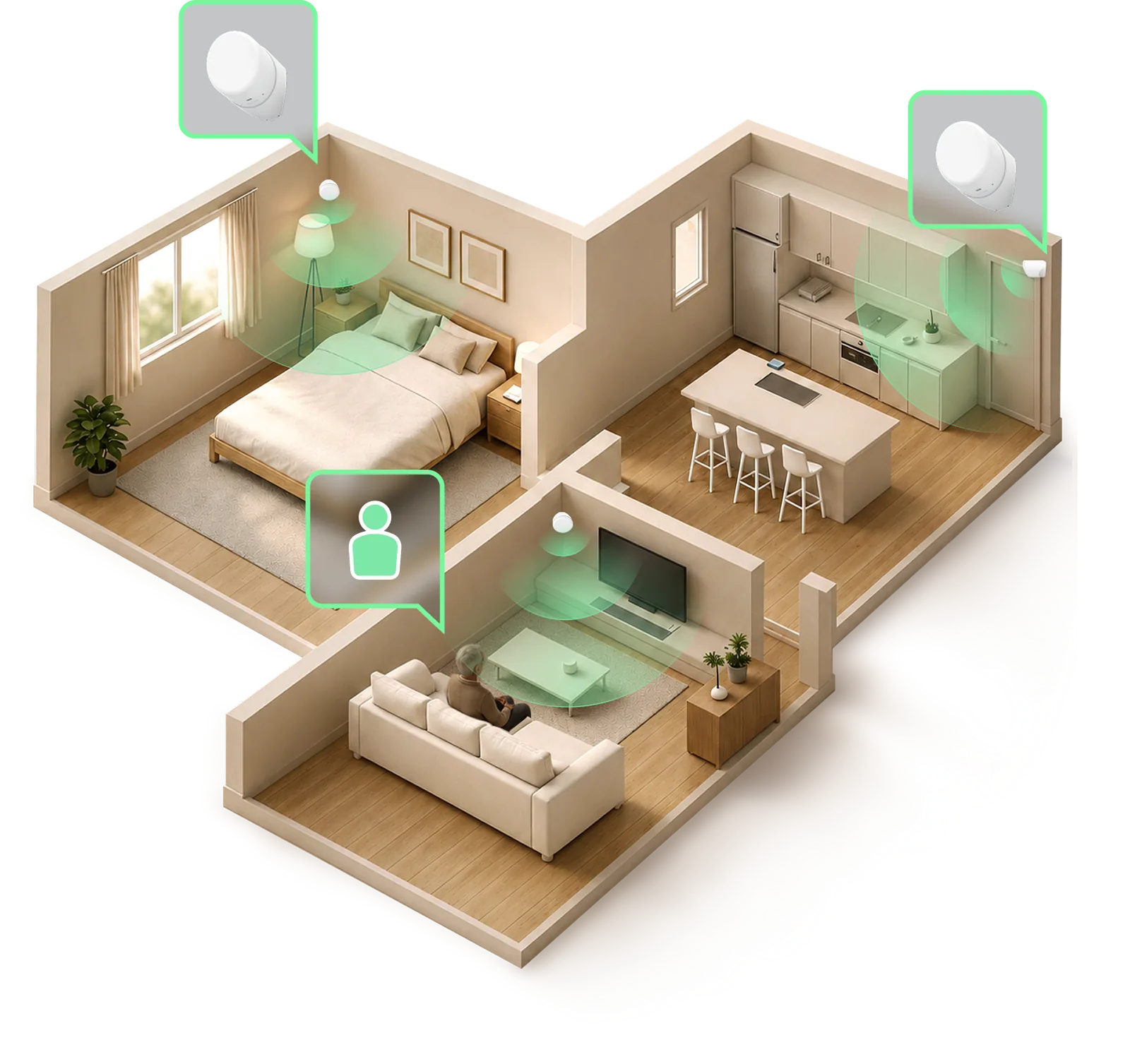
Most serious falls happen at night or in the bathroom, exactly where a camera can't go and a pendant gets left on the counter. Radar works in full darkness and through steam, so the highest-risk rooms aren't blind spots.
How Silvie compares to the two most common alternatives.
| Silvie radar | Camera | Pendant | |
|---|---|---|---|
| Private (no images) | Yes | No | Yes |
| Automatic (nothing to press) | Yes | Yes | No |
| Works at night & in the bathroom | Yes | No | Yes |
| Option | Best at | The gap Silvie fills |
|---|---|---|
| Medical alert pendant / watch (e.g. Medical Guardian) | Help out in the community, GPS location | Only works if it is worn and charged. Most falls happen at home, at night, when it is on the nightstand. |
| Wearable rings / bands (e.g. Oura) | Sleep and activity trends | Has to be charged and worn every day. Not built to call for help in a fall. |
| Phone location sharing | Knowing where they are when they carry it | The phone gets left on the kitchen counter. No help if they cannot reach it. |
| Indoor cameras | A live picture | Most parents will not accept a camera in the bedroom or bathroom, exactly where falls happen. |
| Silvie (contactless radar) | In-home coverage of the rooms falls happen in, no camera, nothing to wear | — |
"Start from what your parent will actually accept. A device they resent won't get used."
It is radar, not a camera. Silvie senses movement and breathing patterns in a room. It never captures an image and never records sound. Families tell us this is the fact that makes a parent comfortable having a sensor in the bedroom.
Silvie runs in the background with nothing for your parent to wear, charge, or remember. There is no button to press and no daily task. It is there to help them stay in their own home longer, not to take over their day.
A three-room setup takes about twenty minutes. The sensors mount on the wall and there is nothing to wire. If you would rather not do it yourself, we will walk you through it.